How to Get a Google Knowledge Panel for Yourself or Your Brand

Rakibul Hasan Razu
AI, GEO & Digital PR Specialist
Key Takeaways
- You can't apply for a Knowledge Panel. Google generates it from the Knowledge Graph. You influence the inputs, then claim the output.
- The Knowledge Graph and the Knowledge Panel are different things. You can exist in the Graph without a visible panel. The Graph also powers AI Overviews, AI Mode, and other features.
- Confidence drives everything. Google shows a panel when it can identify one distinct entity, from multiple independent sources that agree.
- Claiming a panel doesn't create one. Verification only lets you suggest edits to a panel that already exists.
- Most advice online is practitioner observation, not Google documentation. Google has never published a notability threshold. This guide marks which claims are documented and which are field experience.
Contents
- Part 1: Understanding What You're Actually Trying to Earn
- Part 2: Why This Matters More in 2026
- Part 3: How Google Decides, and What's Documented vs. Observed
- Part 4: The Step-by-Step Playbook
- Part 5: After You're Verified, What You Can and Can't Change
- Part 6: Troubleshooting Common Problems
- Part 7: Strategy by Entity Type
- Part 8: A Realistic 90-Day Plan
- Part 9: Mistakes and Myths
- Part 10: Measuring Progress
- Knowledge Panel Checklist
- Final Thoughts
- FAQs
When someone searches your name or brand on Google and a clean, authoritative box appears with your photo or logo, a description, and links to your official profiles, that's a Google Knowledge Panel. It signals legitimacy, takes up prime search real estate, and gives you far more control over your first impression.
The catch: you can't apply for one. Google generates panels automatically from its Knowledge Graph. What you can do is make your entity so well-defined, well-documented, and well-corroborated across the web that Google has little reason not to create one, then claim and manage it.
Part 1: Understanding What You're Actually Trying to Earn
The Knowledge Graph vs. the Knowledge Panel
Most guides blur these two, and the confusion leads to bad strategy.
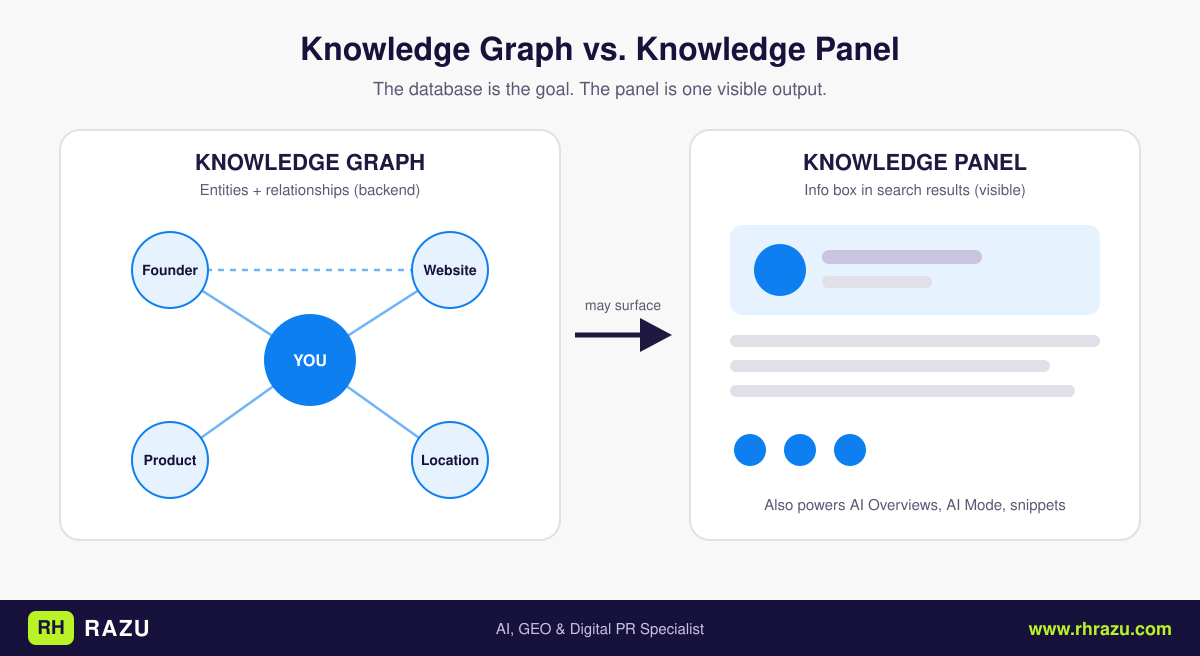
- The Knowledge Graph is Google's backend database of entities (people, organizations, places, works, concepts) and the relationships between them.
- The Knowledge Panel is one visible output of that database: the information box on a search results page.
You can be in the Knowledge Graph without having a panel, and the Graph powers far more than panels, including the entity layer behind AI Overviews, AI Mode, and featured snippets.
So the real goal isn't a box on the results page. It's being a well-understood entity in Google's systems. The panel is the most visible proof that you are.
How Entities Are Stored
Each entity in the Graph is a record with:
- A unique machine identifier (the KGMID). IDs usually begin with
/m/for older entities or/g/for newer ones. - Attributes such as name, type, description, founding date, and website.
- Relationships to other entities: founder of, author of, employee of, located in.
Google works to reconcile every mention of "Jane Smith" or "Acme" on the web into one record. When it can't tell whether two mentions refer to the same entity, or when two entities look too similar, confidence drops. That is the main reason many deserving people and brands don't get a panel.
Types of Panels
| Panel type | Typical subject | How it's generated |
|---|---|---|
| Person / public figure | Founders, authors, executives, artists, athletes | Knowledge Graph + trusted sources |
| Organization / brand | Companies, nonprofits, institutions | Knowledge Graph + website + third-party sources |
| Local business | Businesses with a location or service area | Google Business Profile (a separate system) |
| Creative work | Books, films, albums, apps | Specialized databases + Knowledge Graph |
| Place / event / sports team | Venues, festivals, teams | Mixed sources |
Google's own announcement said any person, organization, sports team, event, or media property with a Knowledge Panel is eligible to get verified and suggest edits. The operative phrase is "with a Knowledge Panel." Eligibility to claim depends on the panel existing first.
Part 2: Why This Matters More in 2026
1. Brand SERP Control
Your brand SERP is what appears when someone searches your name or brand. It is often the first real impression of you, and a panel anchors it with your chosen photo or logo, a description, and links to your official profiles.
2. Entity Authority and E-E-A-T
Google's quality frameworks emphasize experience, expertise, authoritativeness, and trust. Being a recognized, well-documented entity gives Google a concrete object to attach those qualities to. This is an inference from how the systems are described, not a stated ranking factor, but it is widely observed in practice.
3. AI Search and Answer Engines
From a Generative Engine Optimization (GEO) perspective, entities registered in the Knowledge Graph are more likely to be cited in AI-powered search responses. That is a practitioner claim rather than a Google-confirmed mechanic, but the logic is sound. AI systems need dependable entity facts to avoid confusing you with someone else, and structured, corroborated entity data is the cleanest source.
4. Reputation and Accuracy
If you don't define your entity, other sources will. A panel built on a stale directory listing, an old bio, or a namesake's details can spread errors widely. Owning your entity data is defensive as well as promotional.
Part 3: How Google Decides, and What's Documented vs. Observed
Google does not publish panel eligibility criteria. What follows combines Google's public statements with consistent patterns reported by entity-SEO practitioners.
Documented or widely confirmed:
- Panels are generated automatically, and verifying a panel doesn't guarantee one appears.
- Verified owners can suggest factual edits and a featured image.
- Some panel elements can't be edited by owners, including the subtitle, the Wikipedia snippet, images other than the main one, and the "People also search for" section.
Consistently observed by practitioners:
- Wikidata and Wikipedia are strong inputs. Wikipedia's bar is considerably higher than Wikidata's.
- Independent coverage matters more than self-published claims.
- Consistency across sources raises confidence, and contradictions lower it.
- Google increasingly summarizes descriptions from company websites when no Wikipedia entry exists. A strong entity home plus Wikidata can carry significant weight on its own.
A useful mental model is a confidence score built from four factors:
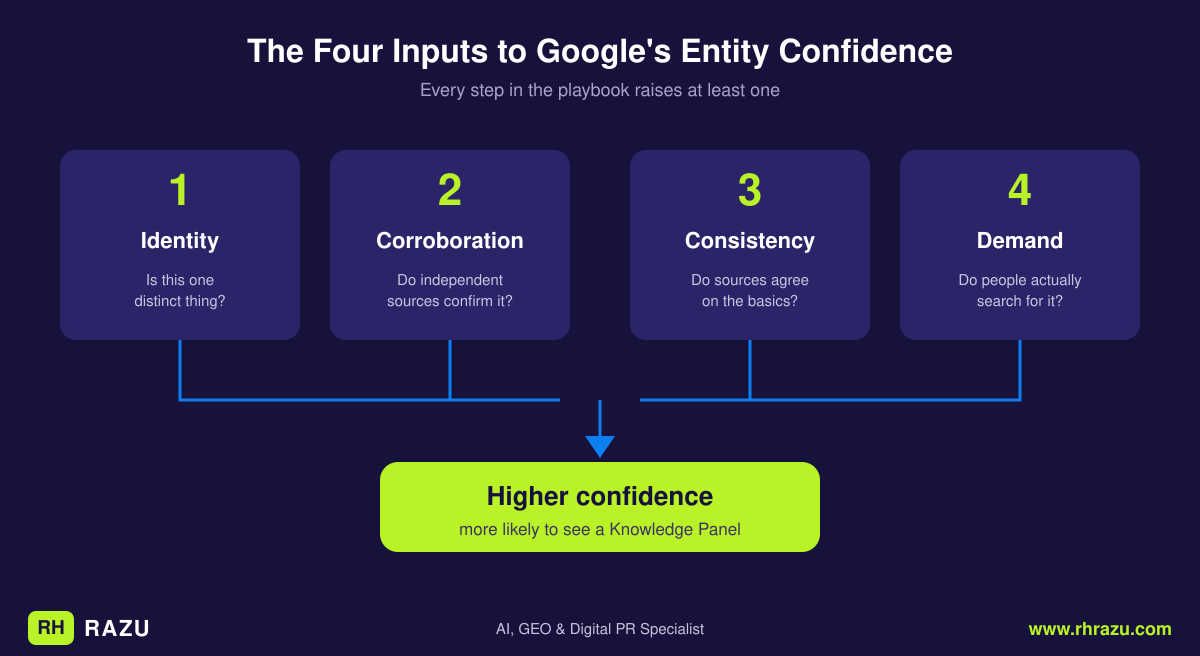
- Identity clarity. Is this one distinct thing?
- Corroboration. Do multiple independent sources confirm it?
- Consistency. Do those sources agree on the basics?
- Demand. Do real people search for it?
Every step below raises one or more of these four.
Part 4: The Step-by-Step Playbook
Step 1: Run an Entity Audit First
Before building anything, find out where you stand.
a) Check the Knowledge Graph directly. Google offers a free Knowledge Graph Search API that lets you check whether your entity exists in the Graph. A basic query looks like this:
https://kgsearch.googleapis.com/v1/entities:search?query=YOUR+NAME+OR+BRAND&key=YOUR_API_KEY&limit=5&indent=True
This requires a Google Cloud API key. Look at what comes back:
- No result: you aren't in the Graph under that name.
- A different entity: a namesake or similar brand may be absorbing the signals.
- Your entity, with few attributes: Google knows you exist but lacks detail.
Not everything stored in the Graph shows up in a panel, so a result here doesn't promise a visible panel.
b) Audit your brand SERP. Search your name and brand in a logged-out or incognito window. Record which results appear in the top 10, whether any panel appears and whether it's accurate, which third-party sources Google prefers for your name, and whether namesakes appear.
c) Inventory your facts. Make one master document of your canonical name, description, founding date or career start, location, key people, products, and official URLs. This is your source of truth for every later step.
Step 2: Establish Your "Entity Home"
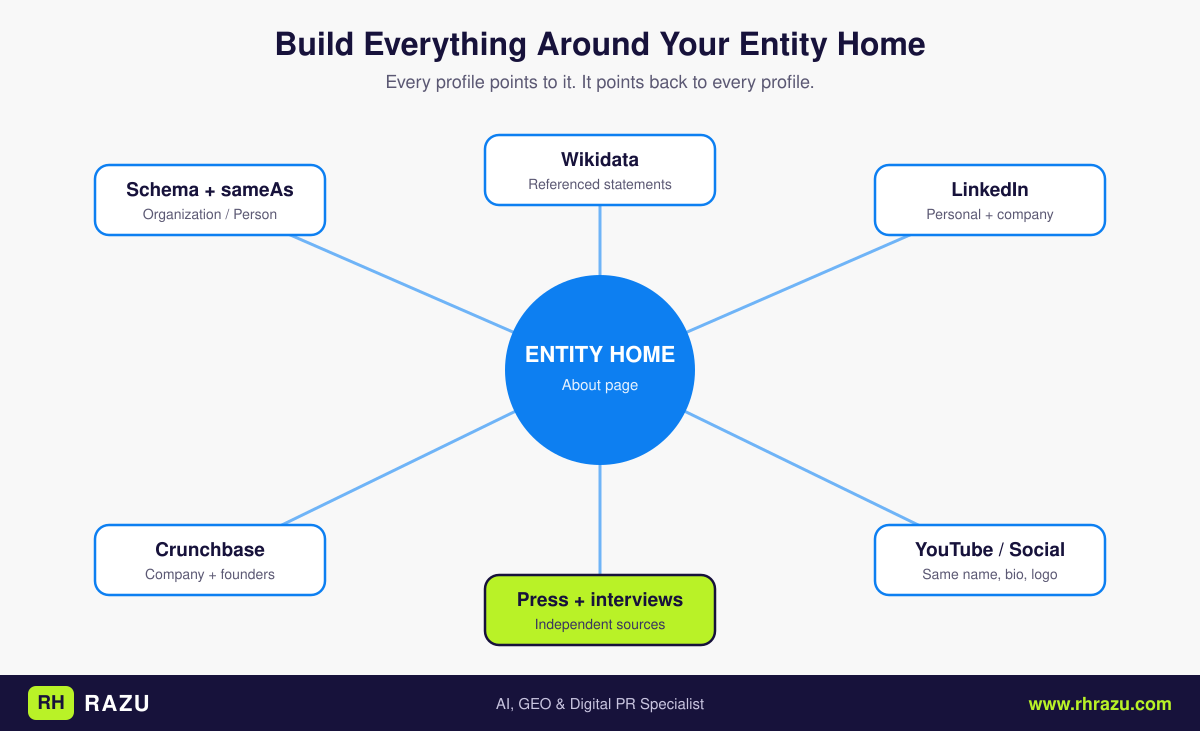
The entity home is a term popularized in entity-SEO circles. It is the single page on your own site that Google should treat as the authoritative definition of you. For a person it is usually a dedicated About page or bio page. For a brand it is usually the About page or homepage.
A strong entity home:
- States who or what you are in the first sentences, plainly and in neutral language
- Lists key facts: founded when, by whom, where, what you do
- Links to your official profiles (and those profiles link back)
- Carries structured data that mirrors the visible content
- Is easy to crawl, indexable, and fast
Write it the way an encyclopedia would, not like a sales page. Google is trying to extract facts, so give it clean ones. Avoid superlatives you can't back up.
Step 3: Add Structured Data That Disambiguates
Schema markup doesn't force a panel, but it removes ambiguity about who you are and which profiles are yours. Use Organization or Person, give the entity a stable @id, and connect it to your other properties with sameAs.
Organization example:
{
  "@context": "https://schema.org",
  "@type": "Organization",
  "@id": "https://www.yourbrand.com/#organization",
  "name": "Your Brand Name",
  "alternateName": "YourBrand",
  "url": "https://www.yourbrand.com/",
  "logo": "https://www.yourbrand.com/images/logo.png",
  "description": "One neutral, factual sentence describing what the company does.",
  "foundingDate": "2018",
  "founder": {
    "@type": "Person",
    "name": "Founder Name",
    "url": "https://www.yourbrand.com/about/founder-name/"
  },
  "sameAs": [
    "https://www.linkedin.com/company/yourbrand",
    "https://www.crunchbase.com/organization/yourbrand",
    "https://www.youtube.com/@yourbrand",
    "https://x.com/yourbrand",
    "https://www.wikidata.org/wiki/Q00000000"
  ]
}
Person example:
{
  "@context": "https://schema.org",
  "@type": "Person",
  "@id": "https://www.yourname.com/#person",
  "name": "Your Full Name",
  "jobTitle": "Founder & CEO",
  "worksFor": { "@id": "https://www.yourbrand.com/#organization" },
  "url": "https://www.yourname.com/",
  "image": "https://www.yourname.com/images/headshot.jpg",
  "sameAs": [
    "https://www.linkedin.com/in/yourname",
    "https://x.com/yourname",
    "https://www.wikidata.org/wiki/Q00000001"
  ]
}
Best practices:
- Use
sameAsonly for profiles you actually control or that unambiguously describe you. - Keep names, descriptions, and dates identical to the visible page text.
- Validate with Google's Rich Results Test and the Schema Markup Validator.
- Don't mark up claims that aren't true or aren't visible to users.
Step 4: Build a Consistent Profile Ecosystem
Claim and complete profiles where Google and other systems gather entity data. Prioritize by relevance to your type of entity:
| Entity type | High-value profiles |
|---|---|
| Founders / executives | LinkedIn, Crunchbase, company site, speaker bios, X |
| Companies | LinkedIn Company Page, Crunchbase, Google Business Profile, industry directories, G2/Capterra (SaaS) |
| Authors | Amazon Author Central, Goodreads, publisher page, Google Books |
| Musicians | Spotify for Artists, Apple Music, MusicBrainz, YouTube Official Artist Channel |
| Filmmakers / actors | IMDb, Letterboxd, agency pages |
| Researchers | Google Scholar, ORCID, university page |
| Local businesses | Google Business Profile, Bing Places, Apple Business Connect |
Use the same name, short bio, logo or headshot, and website link across all of them. This is where most brands quietly lose points: "Acme Inc.," "Acme Co.," and "ACME" scattered across profiles all weaken reconciliation.
Step 5: Create a Wikidata Item (If You Qualify)
Wikidata is a free, structured, community-edited database. It is a frequently cited input to knowledge systems, and its barrier to entry is lower than Wikipedia's. Lower doesn't mean none. Wikidata still expects notability and verifiable references, and it has norms about conflicts of interest.
Approach:
- Confirm you have at least a couple of independent, reliable sources about you. Your own site and social profiles don't count as independent.
- Create the item with a clear label and description (for example, "American marketing consultant").
- Add core statements: instance of, occupation or industry, country, official website, founding date or date of birth where appropriate.
- Add a reference to each statement pointing to an independent source.
- Add external identifiers (LinkedIn, Crunchbase, IMDb, ORCID, and so on) in their designated properties.
- Reference the Wikidata ID in your
sameAsmarkup.
Cautions:
- Don't fabricate sources or create items for entities that clearly aren't notable. They get deleted.
- Disclose any relationship if you're editing about yourself or your employer.
- Don't treat Wikidata as a guaranteed shortcut. It is one input.
Step 6: Wikipedia, Only If You Genuinely Qualify
A Wikipedia article is among the strongest entity signals, and it's the hardest to get legitimately. Wikipedia's notability standard requires significant coverage in multiple independent, reliable secondary sources.
- Read the notability guidelines for people (WP:BIO) or organizations (WP:ORG) first. Many founders and small brands don't meet them yet.
- Disclose conflicts of interest. Wikipedia has formal rules, and paid editing requires disclosure.
- Use Articles for Creation (the draft review process) rather than publishing directly.
- Write neutrally with cited sources. Promotional language is the most common cause of deletion.
- Don't hire "guaranteed Wikipedia page" services. Undisclosed paid editing can result in deletion and lasting reputational damage.
If you aren't there yet, treat Wikipedia's criteria as a roadmap. Whatever earns you independent press coverage also moves you toward qualifying.
Step 7: Earn Independent, Authoritative Coverage
This is the highest-leverage step and the slowest. Google weighs what credible third parties say about you more heavily than what you say about yourself.
Tactics with real corroboration value:
- Earned press in recognized or industry-relevant publications
- Expert commentary quoted in journalists' articles
- Podcast and interview appearances with show notes naming and linking you
- Conference speaker pages and event listings
- Awards, certifications, and industry "best of" lists
- Original research or data others cite
- Book listings and academic citations, where relevant
- Reputable guest articles with proper author bios
What doesn't help: paid "press release" blasts on throwaway sites, directory spam, fake or purchased coverage, and mass low-quality listings. A few mentions from respected, topically relevant sources outweigh dozens of weak ones.
Step 8: Make Facts Consistent Everywhere
Audit and fix mismatches in legal name vs. brand name vs. abbreviations, founding year and founder names, headquarters and addresses, job titles and bios, logos and headshots, and product and service names.
Treat this as ongoing hygiene. When you rebrand, move, or change titles, update the entity home, schema, profiles, Wikidata, and directories together.
Step 9: Build Branded Search Demand
Panels tend to appear for entities people actually look up. Supporting activities include content that builds name recognition, newsletter and social growth, podcast guesting, partnerships, and PR. Branded search growth is visible in Google Search Console (queries containing your name), so you can track it.
Step 10: Claim and Verify the Panel When It Appears
When a panel exists, look for "Claim this knowledge panel" near the bottom. Per practitioner guides, Google asks you to verify through connected accounts such as your official website via Search Console, YouTube, or social profiles listed on the panel, and you typically need to verify only one. Google's original 2018 announcement described signing in to an official account to begin the process, though the specific options have changed over time, so expect the current flow to differ somewhat.
Practical tips:
- Verify your site in Google Search Console beforehand. It is often the cleanest route.
- Use a Google account you can retain long term, ideally tied to the entity rather than a personal inbox that might change hands.
- Expect an identity confirmation step for some entities.
- Reported turnaround is often a few days. One vendor describes responses typically arriving within 24 to 48 hours, with an official window of up to 72 hours. Treat that as an estimate, not a guarantee.
Part 5: After You're Verified, What You Can and Can't Change
You can generally:
- Suggest factual corrections to the information shown
- Suggest a featured image
- Update the links to official profiles Google associates with you
- Request removal of inaccurate content
You generally can't:
- Edit text pulled from Wikipedia directly
- Change the subtitle
- Control "People also search for"
- Force Google to accept a suggestion
The key insight: suggestions are reviewed against Google's other sources. If your suggested fact contradicts a high-authority source, it is likely to be rejected. The durable fix is almost always to correct the upstream source (Wikidata, your entity home, a directory, a news article) and then submit the suggestion.
Part 6: Troubleshooting Common Problems
"I Have No Panel and Don't Know Why"
Work through the diagnostic in order:
- Are you in the Knowledge Graph at all? Check with the API.
- Is your name ambiguous? Namesakes can absorb or block signals.
- Do you have independent corroboration? If everything about you traces back to you, confidence stays low.
- Are your facts consistent? Conflicts delay or prevent panels.
- Is there search demand? Very low branded search volume works against you.
"The Panel Shows the Wrong Person or Brand"
This is a disambiguation failure. Strengthen distinguishing context (profession, location, company) consistently across your entity home, schema, and profiles. Build independent mentions that pair your name with that context. Then submit feedback through the panel.
"My Panel Has Outdated or Incorrect Information"
Find the source Google is drawing from, often a directory, an old bio, Wikipedia, or Wikidata, and fix it there. Then claim the panel and use "Suggest changes."
"My Panel Disappeared"
Panels can come and go as Google's confidence shifts or systems are updated. Re-audit for new inconsistencies, lost sources, or a competing entity, and keep building corroboration. Panels can also vary by device, location, and query phrasing, so check across contexts before concluding it's gone.
"I Can't See the 'Claim This Panel' Option"
Not every panel offers claiming, and options vary by entity type and eligibility. Make sure you're signed into the Google account you intend to use, and check Google's current Knowledge Panel help documentation for eligibility.
Part 7: Strategy by Entity Type
The founder or executive. Anchor your identity to a personal entity home, connect it to your company's schema (worksFor, founder), and pursue interviews, podcasts, and speaking. Crunchbase and LinkedIn are high-leverage starting points.
The B2B or SaaS brand. Prioritize a strong About page, consistent company profiles, review-platform presence, Crunchbase, and earned coverage in trade publications. Wikidata becomes viable once you have a few independent articles.
The author. Use Amazon Author Central, Goodreads, your publisher's page, and Google Books. Consistent author-name spelling across editions matters.
The artist or musician. Verified artist profiles on streaming platforms, a YouTube Official Artist Channel, MusicBrainz, and press or playlist coverage are the key corroborators.
The local business. You may see a Google Business Profile panel rather than a full Knowledge Panel. Accurate NAP data, reviews, local citations, and a clear website are the priority. A larger Knowledge Panel typically requires wider notability beyond local listings.
Part 8: A Realistic 90-Day Plan
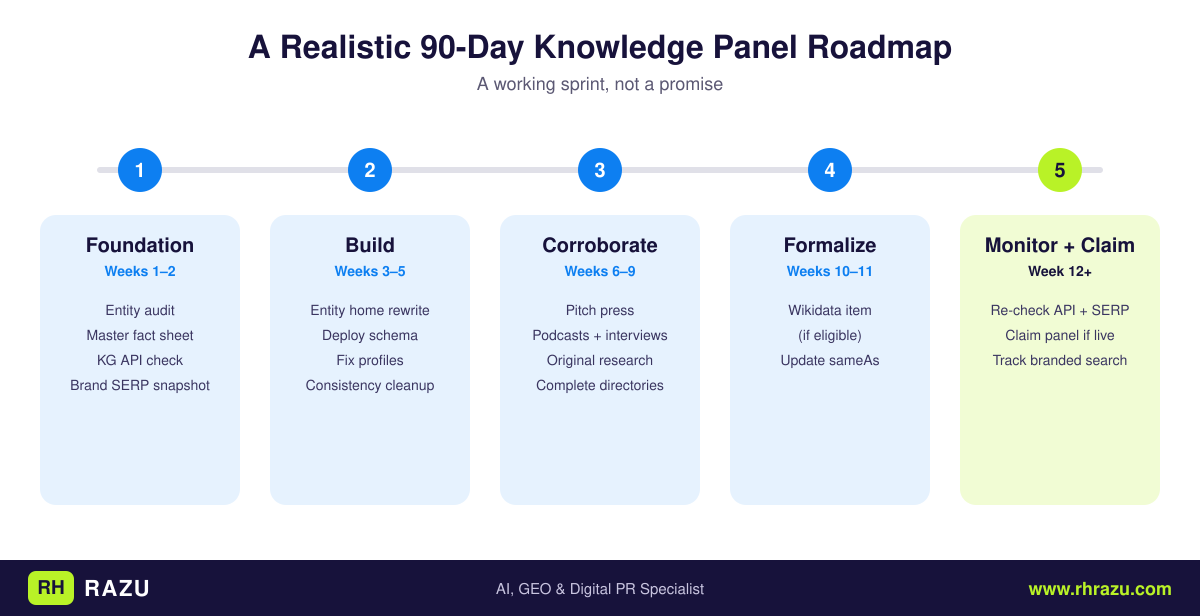
| Phase | Weeks | Focus |
|---|---|---|
| Foundation | 1–2 | Entity audit, master fact sheet, KG API check, brand SERP snapshot |
| Build | 3–5 | Entity home rewrite, schema deployment, profile cleanup and consistency fixes |
| Corroborate | 6–9 | Pitch press, secure interviews and podcast guesting, publish original research, complete directories |
| Formalize | 10–11 | Create or refine Wikidata item (if eligible), update sameAs |
| Monitor and claim | 12+ | Re-check API and SERP, claim panel if it appears, track branded search in Search Console |
Ninety days is a working sprint, not a promise. Outcomes depend heavily on how notable the entity already is.
Part 9: Mistakes and Myths
Myth: "Buy a service and get a guaranteed panel." No one can guarantee a panel because Google decides. Even sellers in this market acknowledge it. Be skeptical of anyone who promises otherwise.
Myth: "Claiming the panel creates it." Claiming only gives you management access to a panel that already exists.
Myth: "Schema markup forces a panel." Structured data helps disambiguation, but it is a supporting signal rather than a trigger.
Myth: "Wikipedia is mandatory." It helps, but many entities have panels based on other sources.
Mistake: Inconsistent identity across profiles and pages.
Mistake: Self-referential proof. Ten pages you wrote about yourself count as one source.
Mistake: Violating Wikipedia or Wikidata rules, which gets content removed and can damage trust.
Mistake: Quitting early. Entity building is cumulative and slow.
Part 10: Measuring Progress
Track these over time:
- Knowledge Graph API presence: does your entity return, with how many attributes?
- Brand SERP quality: how many top results do you control or influence?
- Panel presence and accuracy across devices and locations
- Branded search impressions and clicks in Search Console
- Independent mention count and the authority of the sources
- Consistency score: how many profiles match your master fact sheet?
Knowledge Panel Checklist
Copy this into your own doc or print it.
Foundation
- Master fact sheet created (name, description, dates, location, key people, URLs)
- Knowledge Graph Search API checked for your name and brand
- Brand SERP audited in an incognito window and screenshotted
- Namesakes or similar brands identified
On-site
- Entity home page identified and rewritten in neutral, factual language
- Organization or Person schema deployed with a stable
@id -
sameAslinks point only to profiles you control or that clearly describe you - Schema validated in the Rich Results Test and Schema Markup Validator
- Site verified in Google Search Console
Profiles
- LinkedIn, Crunchbase, and relevant industry profiles completed
- Same name, bio, logo or headshot, and URL used everywhere
- Google Business Profile set up (if you have a location or service area)
Corroboration
- At least two independent, reputable third-party sources describe you
- Podcast, interview, speaking, or award mentions collected
- Wikidata item created with referenced statements (if eligible)
- Wikipedia notability honestly assessed; conflicts of interest disclosed
Consistency and monitoring
- Mismatches in names, dates, titles, and addresses fixed
- Branded queries tracked in Search Console
- KG API and brand SERP re-checked every month
- Panel claimed and verified once it appears
Final Thoughts
A Knowledge Panel is a byproduct of a clear identity, independent corroboration, and consistent facts. The brands and people who get them rarely chase the panel itself. They define who they are in machine-readable terms, earn coverage from sources Google already trusts, and keep their information consistent over time.
Start with the audit, because you can't improve what you haven't measured. Then fix your entity home, deploy schema, clean up your profiles, and put real effort into earning independent coverage. When the panel arrives, claim it, then keep it accurate.
A note on evidence: Google has not published a Knowledge Panel checklist. Where this guide states how Google's systems work, it relies on Google's public statements and on patterns that entity-SEO practitioners consistently report. It flags the difference where it matters. Verify current claiming steps in Google's help documentation, since the verification flow changes periodically.
FAQs
Can I request a Google Knowledge Panel directly?
No. Panels are generated automatically. You can strengthen the signals that lead to one and claim it once it exists.
How long does it take to get a Knowledge Panel?
It ranges from weeks to over a year, depending on your existing notability and how well-documented you are online. No timeline is guaranteed.
Do I need a Wikipedia page?
Not always. It's a strong signal, but panels can be based on other trusted sources.
What's the difference between the Knowledge Graph and a Knowledge Panel?
The Graph is the database. The panel is a visible output. You can be in the Graph without a panel.
Can small businesses get Knowledge Panels?
Many small businesses get a Google Business Profile panel. A broader Knowledge Panel usually requires wider notability.
Is the Knowledge Graph Search API worth using?
Yes. It's a free way to check whether your entity exists and what Google has recorded, though it doesn't show everything that could appear in a panel.
Does a Knowledge Panel help with AI search?
Practitioners report that well-defined entities are represented more accurately and cited more often in AI answers. Google hasn't published specifics, so treat it as a strong hypothesis rather than a proven mechanic.
Can I delete my panel?
Not outright. Claimed owners can suggest edits or request removal of specific content, and Google decides.
Will claiming my panel hurt anything?
No. Claiming is free, and it gives you the ability to flag errors.
Written by
Rakibul Hasan Razu
AI, GEO & Digital PR Specialist
RH Razu (Rakibul Hasan Razu) is an AI, GEO & Digital PR specialist. He helps SaaS, eCommerce and service brands get found on Google, get cited in AI answers, and earn coverage in high-authority international media publications.
- 1,000+ published articles
- International media coverage
- Cited across Google & AI answers
- Founder of 9 ventures